MCP Tools That Supercharge Vibe Coding
Prompt-only AI workflows burn tokens, hallucinate libraries, and can't touch your repo. Here's how Model Context Protocol servers cut token use by 98.7% and turn agents from passive chatbots into active engineering teammates.

- 01
- 02MCP Tools That Supercharge Vibe Codingreading now
- 03
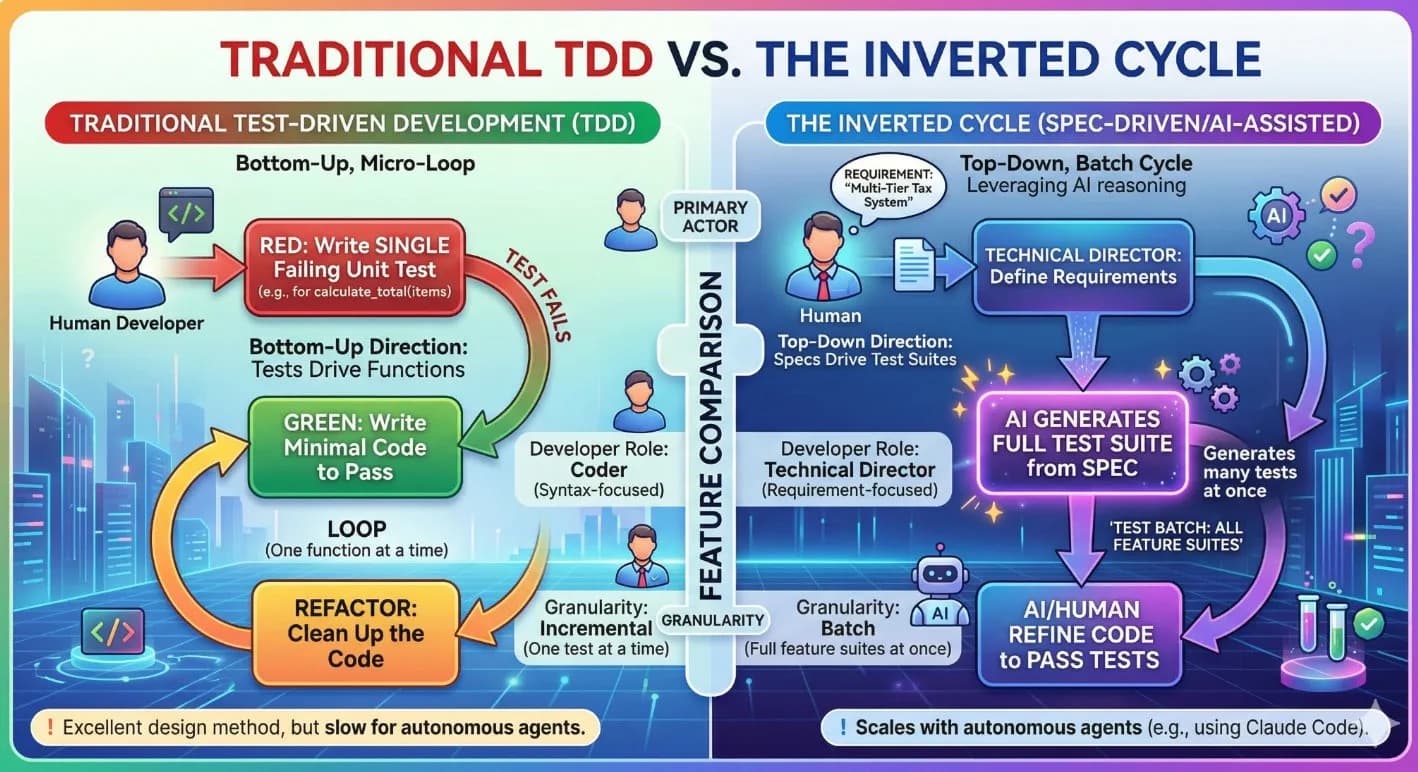
Earlier in this series, we introduced the Inverted TDD Cycle - the workflow that keeps AI-assisted engineering accountable, testable, and secure by design. But a workflow is only as effective as the tools available to execute it. Without the right tooling, even the best cycle collapses back into the same "generate-and-pray" pattern it was meant to replace.
As Kipanga moved deeper into agentic software engineering, we found that writing prompts was no longer good enough. For a hobbyist, a well-crafted prompt is plenty to generate a script. For a company shipping enterprise-grade React and Node.js applications, a prompt-only workflow is a dangerous bottleneck.
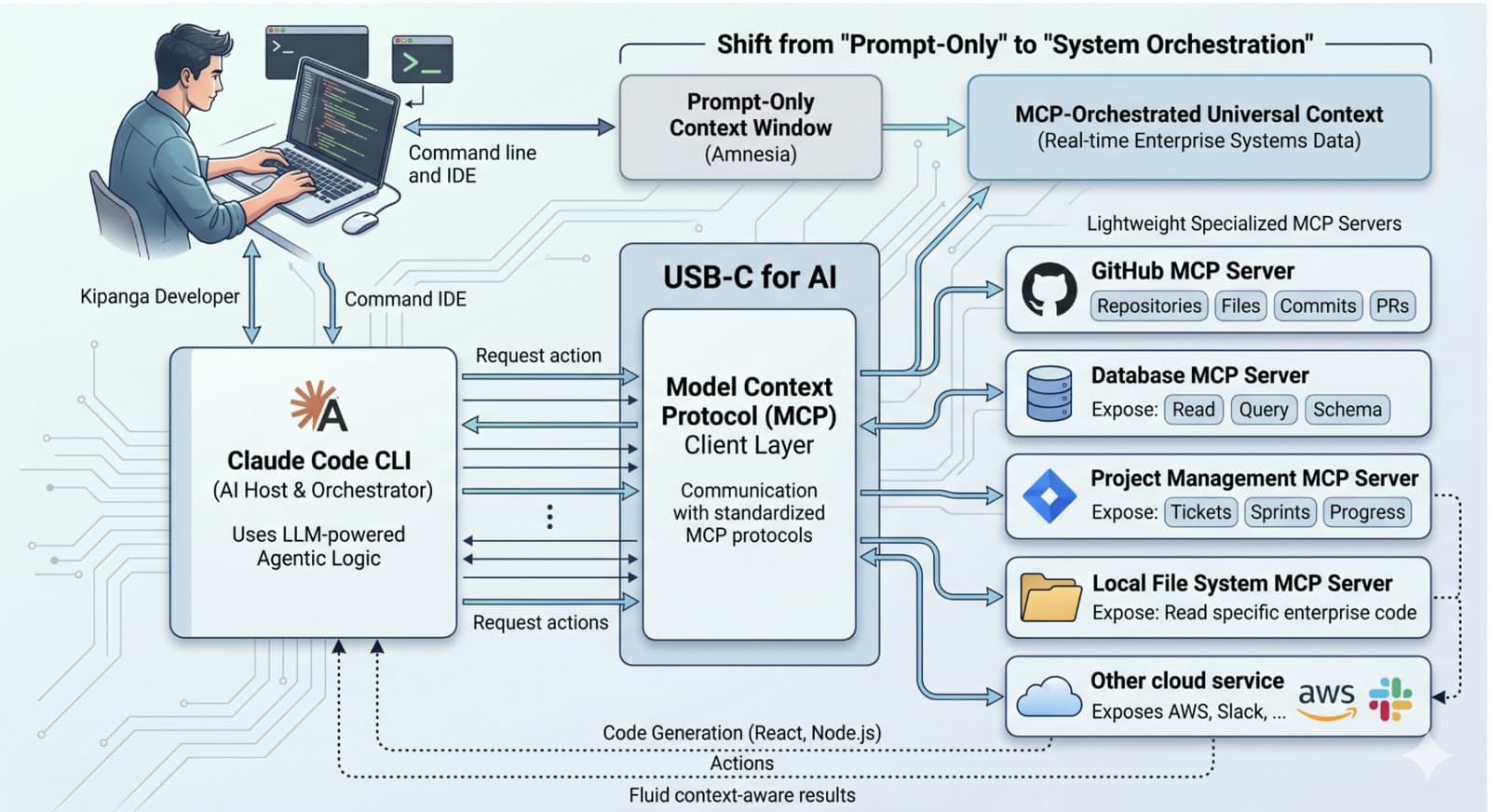
Prompts suffer from context amnesia - the model's knowledge is frozen in time, and its memory of your specific project structure is bounded by its context window. To move from guessing at code to orchestrating systems, we needed the Model Context Protocol (MCP).
Vibe coding without MCP is just fast typing. Vibe coding with MCP is professional system orchestration - the difference between an AI that advises you on a fix and an AI that opens the pull request.
What is MCP?
Think of MCP as the "USB-C for AI" - or the "TCP/IP moment" for large language models. Traditionally, if you wanted an AI to read your database or check a Jira ticket, you had to build a bespoke integration for every tool, every model, and every API update. MCP provides a universal, standardized protocol that lets any AI host connect to any external tool or data source through a common interface.
The architecture is a three-entity model:
- The Host. The AI environment where your developers actually work - Claude Code CLI, Cursor, or any similar agentic IDE.
- The Client. The connection layer inside the host that manages the MCP protocol and routes requests to the right server.
- The Server. A lightweight program that exposes local or remote resources - files, APIs, databases, project-management systems - as tools the AI can call directly.
Once a server is connected, the agent doesn't need to be prompted with a wall of context. It fetches what it needs, executes what it's asked, and reports back. The context window stops being a prison and starts being an index.
Why MCP Beats "Prompt Engineering"
In a professional setup, MCP tools deliver three force multipliers that pure prompting cannot match.
Context efficiency. Prompts are expensive and slow. Asking an AI to "summarize this 10,000-line log" burns roughly 150,000 tokens just to get the log into the model's context. With an MCP server, the AI can execute a local .filter() call and receive only the relevant five lines. In specific workflows, this has been shown to reduce token consumption from 150,000 to just 2,000 - a 98.7% saving - while also returning answers in a fraction of the time.
Zero-hallucination grounding. Standalone models rely on training data that can be twelve or more months out of date. MCP servers like Context7 or Microsoft Learn inject real-time, version-specific documentation for libraries like React 19 or Node.js 22 directly into the agent's reasoning loop. The agent writes code against the actual current API - not a best-guess reconstruction from last year's docs.
Active agency. A prompt is a conversation; an MCP tool is an action. Through MCP, an agent isn't just telling you how to fix a bug - it's reading your repository, running a Playwright test to verify the UI, and opening the GitHub pull request for you. The engineer reviews outcomes, not instructions.
The Essential MCP Toolkit for Vibe Coding
We run Claude Code CLI as our agentic IDE, with GitHub for source control and a Node.js + React stack. Against that baseline, these are the MCP servers we recommend for any enterprise engineering setup, and the ones we install with every team that goes through our AI Augmented Academy.
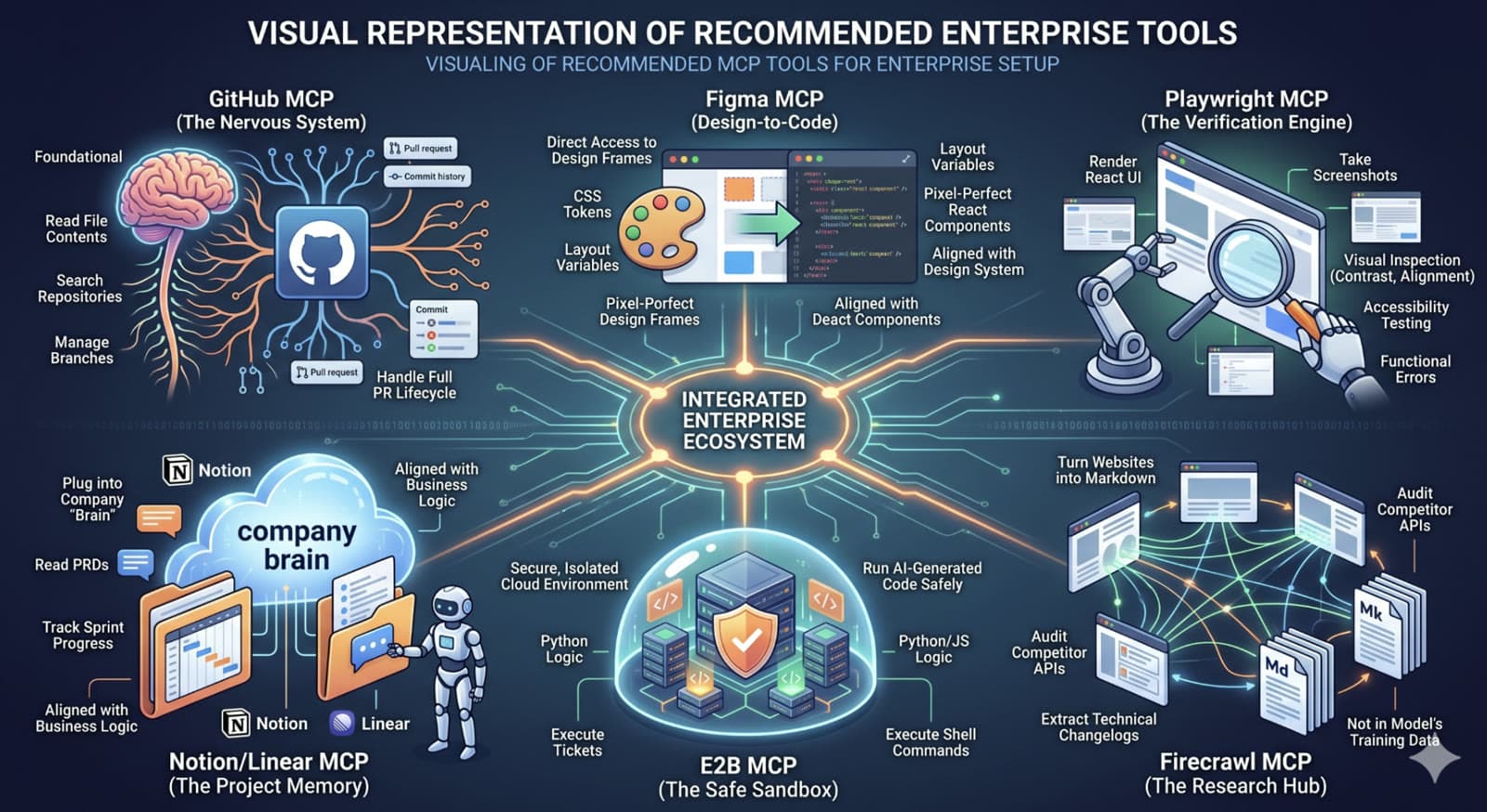
GitHub MCP - The Nervous System. Foundational. It lets the agent read file contents, search across repositories, manage branches, and run the full pull-request lifecycle without a developer copy-pasting code into a chat window.
Figma MCP - Design-to-Code. Instead of the agent guessing layout from a screenshot, this server gives it direct access to design frames, CSS tokens, and layout variables. The React components it produces come out aligned with your design system the first time - not after three review cycles.
Playwright MCP - The Verification Engine. Professional code has to be tested. This server lets the agent render a UI in a headless browser, take screenshots, and inspect them for accessibility issues like contrast and alignment, as well as functional regressions. It closes the loop between "the code compiles" and "the feature actually works."
Firecrawl MCP - The Research Hub. It converts any live website into clean, LLM-ready Markdown. Critical when your team needs to audit a competitor's API, pull a changelog that isn't in the model's training data, or ingest third-party docs that move faster than any model's knowledge cutoff.
E2B MCP - The Safe Sandbox. Running AI-generated code locally is a security risk. E2B provides a secure, isolated cloud environment where the agent can execute Python or JavaScript and run shell commands without touching your actual machine. It's the difference between letting an agent experiment freely and letting it experiment on your laptop.
Notion / Linear MCP - The Project Memory. These servers plug the agent into your company's brain. It can read PRDs, track sprint progress, and update tickets like a real teammate - which means the code it writes stays aligned with actual business requirements instead of drifting away from them over the course of a sprint.
These six servers form the scaffolding of a production-grade agentic development setup. Individually, any one of them replaces hours of weekly manual work. Collectively, they retire the assumption that AI-assisted development means copy-pasting code into a chat window.
MCP Makes Vibe Coding Reliable & Easy
Vibe coding without MCP is just fast typing. Vibe coding with MCP is professional system orchestration. By shifting the AI from a passive chatbot into an active agent with real-time access to your documentation, designs, repositories, and deployments, you eliminate the last mile of manual work that usually kills developer productivity.
Want to architect an enterprise-grade MCP toolkit for your engineering team? Let's talk about rolling out Spec-Driven Development and MCP orchestration across your organization.
Find Kipanga useful? Add us as a preferred source and Google will surface more of our work in your results.


25+ years in technology innovation. Founder and former CTO of MyFleet, a leading telematics platform. Technical Lead for GenAI at University of Newcastle. Expert in AI, Machine Learning, IoT, and Agile development.
View profile
Ready to scale your operations?
Let's discuss how Kipanga can architect the systems that power your next phase of growth.
Start the Discovery